Find the AI that has access to your stuff.
AI assistants, browser extensions and "Sign in with…" apps quietly collect permission to read your email, files and browsing. ShadowSweep finds every one of them on your PC, tells you how risky each is, and lets you shut off the ones you don't trust.
See it. Understand it. Shut it off.
One scan gives you a complete picture of the AI tools touching your data, ranked by risk.
Full AI access scan
Finds AI browser extensions, connected-account permissions and installed AI apps in one pass.
Risk ratings in plain English
Each item is rated High, Medium or Low, with a one-line explanation of what it can see.
Shareable report
Save a clean report of what was found — for your records or for whoever helps with your PC.
One-click revoke PRO
Remove risky extensions, stop AI apps from starting with Windows and jump straight to the page that cuts off account access.
Rescan & compare PRO
Run it again any time and see what's new since your last sweep, so nothing creeps back in.
Private by design
The scan runs on your computer. ShadowSweep doesn't upload your scan results anywhere.
Three steps. A few minutes.
Download & install
Install the free version like any Windows program. No sign-up.
Run a sweep
Click Scan. ShadowSweep checks your browsers, accounts and installed apps for AI access.
Clean up
Review the risk report. Upgrade to Pro to revoke what you don't want with one click.
All your computers, one main PC
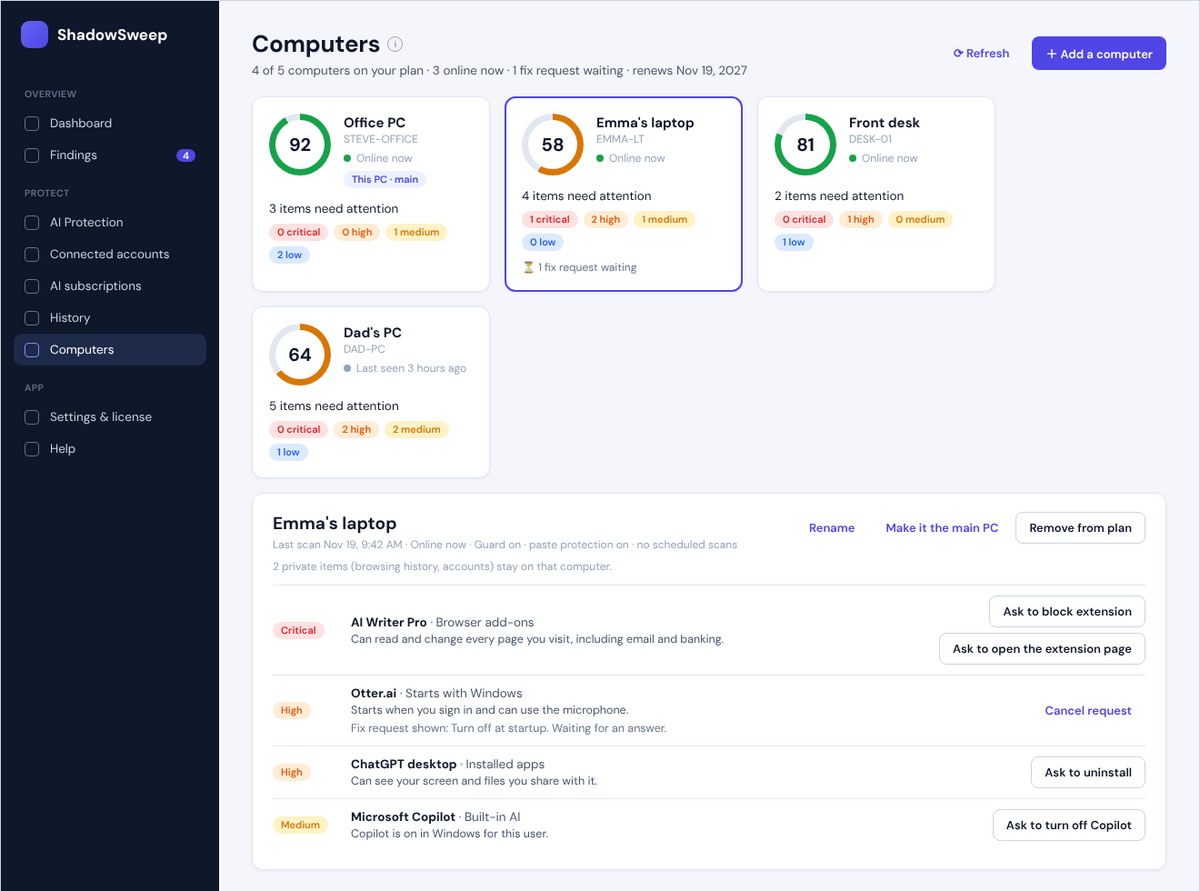
For a household or a small business. One PC becomes the main PC and shows every computer on your plan: its score, the AI tools it found, what needs attention and whether it's online.
- Add a computer by name, like "Emma's laptop" or "Front desk", with a one-time join code
- Send a fix request; the person there sees who sent it and clicks Allow
- Rename or remove computers, or make another PC the main PC
- Browsing history, files and anything copied never leave each computer
Buy anywhere. Activate on your PC.
Buy on your phone or another computer — the key is emailed to you. Paste it into ShadowSweep on the PC you want protected.
One key, your computers
A key is tied to the computers on your plan once they're activated: one PC for Pro, up to 3, 5, 10 or 25 for the bigger plans. It can't be shared beyond them.
Move it yourself
Getting a new computer? Deactivate in ShadowSweep on the old PC, then activate on the new one, or just choose Move it here. No support ticket needed.
Renew or grow in a click
ShadowSweep tells you before your license expires. Renew or add computers from inside the app: same key, and the time you have left is kept.
| Operating system | Windows 10 or Windows 11, 64-bit |
|---|---|
| Browsers checked | Microsoft Edge, Google Chrome, Mozilla Firefox |
| Internet | Needed once to activate Pro, and periodically to confirm the license. Multi-computer plans use it to keep the main PC up to date. |
| Permissions | Installing requires an administrator account |
Find out what's watching. It's free.
Run your first sweep in the next five minutes.