Scan free. Upgrade when you want to fix it.
Your Pro license key is emailed the moment your payment goes through. Taxes are calculated at checkout.
Free
Full AI access scan, risk ratings, plain-English advice, step-by-step manual fixes and reports. Free forever, on as many PCs as you like.
Pro
Pro 3
Pro 5
Pro 10
Pro 25
- Everything in Free
- One-click fixes, with undo
- Turn off AI built into Windows, Edge, Chrome and Office
- Scheduled scans and new-tool alerts
- Move a license to a new PC yourself
- All updates during your license year
- Pro 3 and up: one main PC sees every computer
- Pro 3 and up: name each computer, send fix requests
- Email support
Look after every computer from one
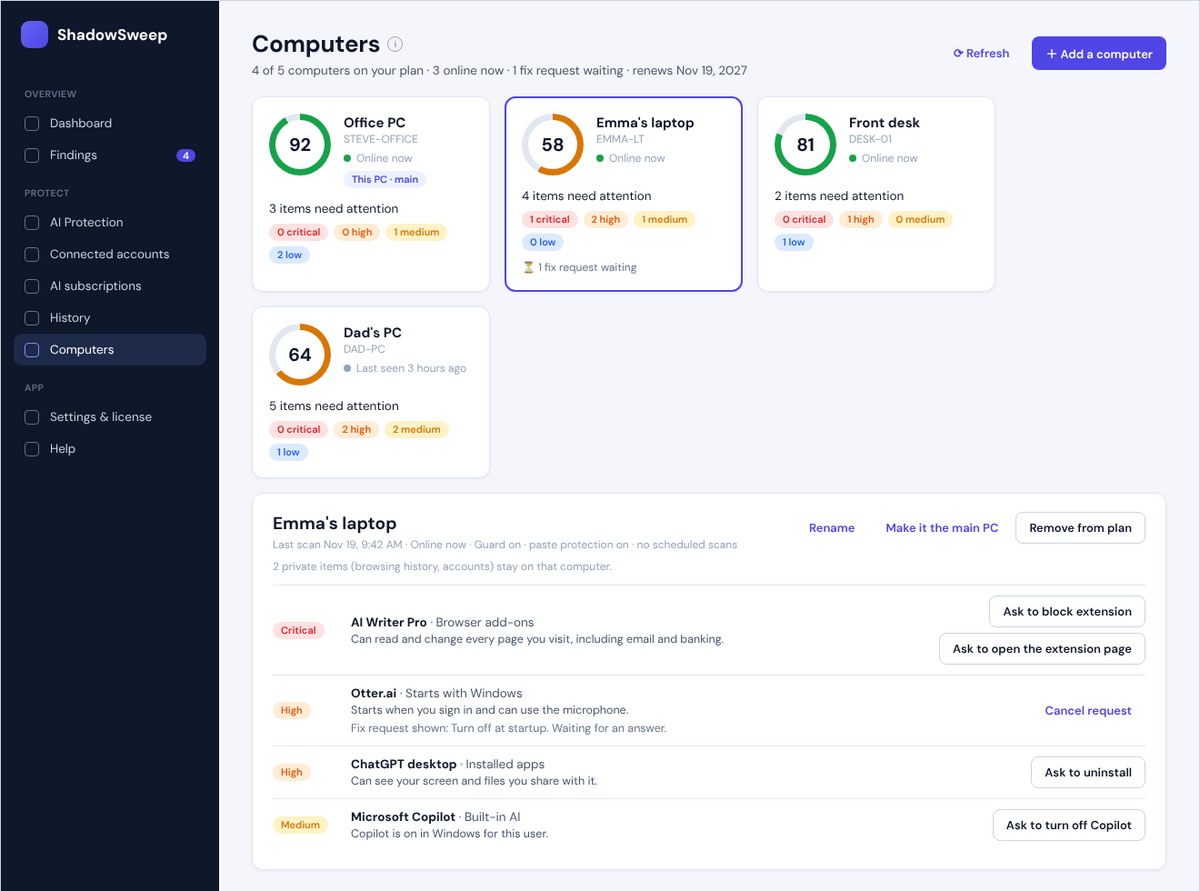
The first PC you activate becomes your main PC. Add the others by name ("Emma's laptop", "Front desk") with a one-time join code. The main PC shows each computer's score, the AI tools it found and what can be fixed.
Send a fix request and the person at that computer sees exactly who sent it and what will change. Nothing happens until they click Allow, and most fixes can be undone.
Private things stay private: browsing history, files, accounts and anything copied never leave the computer they're on.
For teams and organizations
Planned plans are shown below. Prices and purchasing open at launch.
Team
- Central dashboard
- Inventory across all team PCs
- Scheduled scans
- Email support
Business
- Everything in Team
- Microsoft 365 & Google Workspace app audits
- Policies and remote revoke
- Audit-ready reports
Custom
- Everything in Business
- Single sign-on (SSO)
- SIEM export
- Priority support
What does "per year" mean?
A Pro license (for 1 or more computers) runs for one year from the day you buy it. ShadowSweep reminds you before it expires. When it expires, Pro features switch off and the free scan keeps working. Click Renew in ShadowSweep (or on this page from the app) to keep the same key and add another year.
Who processes my payment?
Orders are processed by FastSpring, our authorized reseller and merchant of record. They handle payment, sales tax and VAT, and your card statement will show FastSpring.
Can I buy on my phone and use it on my PC?
Yes. Buy from any device; the license key is emailed to you. Enter it in ShadowSweep on the PC you want to use it on. On a multi-computer plan, that PC becomes your main PC.
Which plan do I need?
Count the Windows PCs you want Pro on. Pro covers one; Pro 3, 5, 10 and 25 cover up to that many, with one main PC that sees all of them. A household with a couple of laptops and a desktop usually picks Pro 3 or Pro 5; a small office, Pro 10 or Pro 25. For more than 25 computers, see ShadowSweep Enterprise below.
Can I add computers later?
Yes. In ShadowSweep, open Settings & license and click Add more computers (or Upgrade to more computers). That opens this page for your license. Your key stays the same, the time you have left is kept, and a year is added on top. A 1-computer license becomes a plan, and that computer becomes the main PC.
Do the other computers need their own key?
No. On the main PC, click Computers, then Add a computer, give it a name and you get a 6-character join code. Type it into Join a plan on the other computer. The key itself stays with you.
What can the main PC see on the other computers?
A summary of each scan: the score, which AI tools were found, their risk and what can be fixed, plus whether Guard and scheduled scans are on. It never sees browsing history, files, accounts, passwords or anything copied. Fixes it asks for only happen when someone at that computer clicks Allow.
Do you offer refunds?
Yes — within 30 days of purchase. See the refund policy.